


Greetings from the LETR WORKS Team!
First and foremost, we would like to express our sincere gratitude for your continued support and interest in LETR WORKS. We are pleased to announce the key highlights of our scheduled February update.
The latest version, v2.11.3, was successfully deployed on February 9, 2026, at 2:00 PM (KST).
----------------------------------------------------------------------------------------------------
We have improved the "DRM-based Video Sharing" feature, first introduced in our December update, to make your workflow even more efficient.
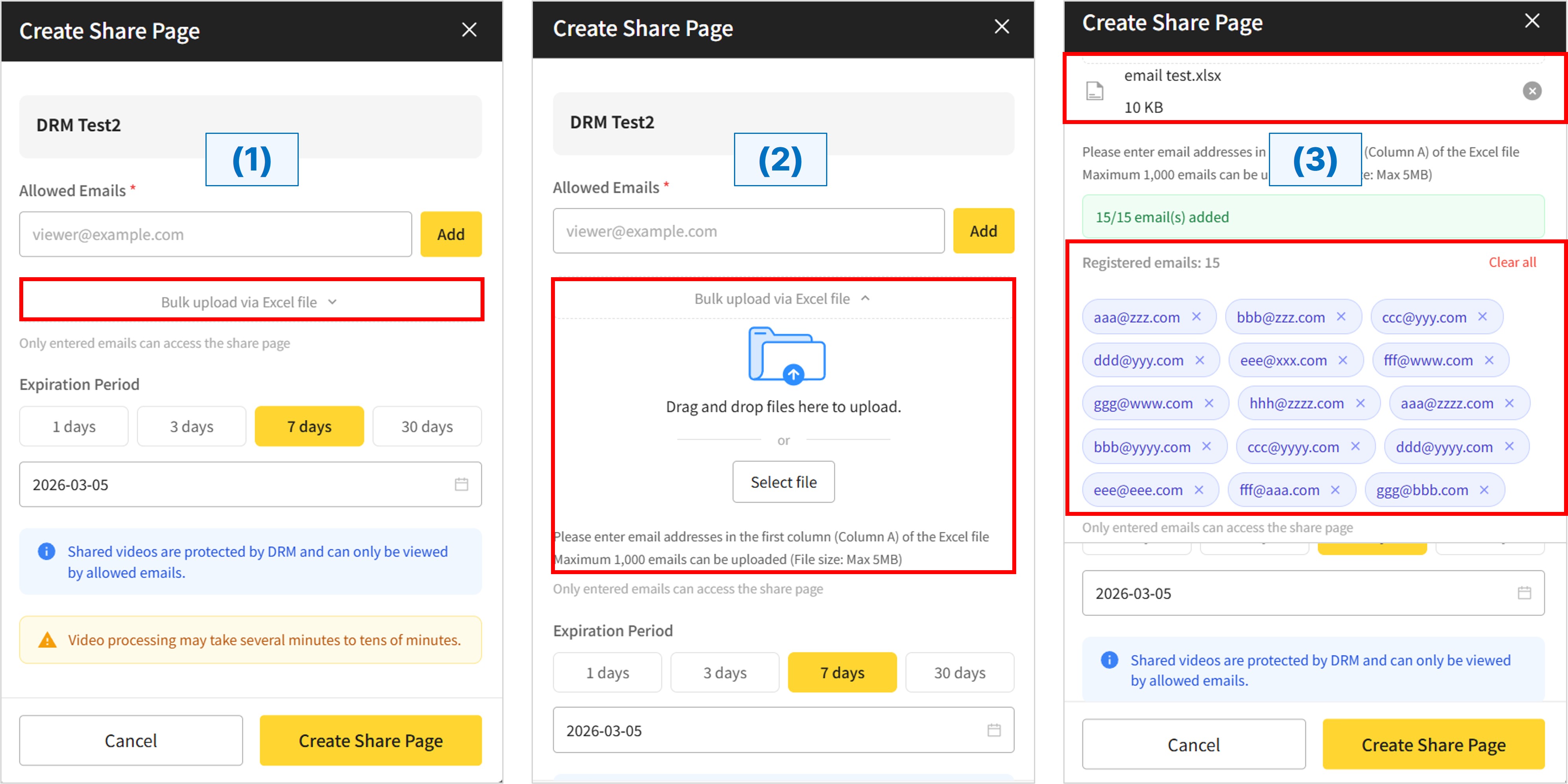
Access to video share pages is restricted to "Allowed Emails" only. With this update, we have introduced a "Bulk upload via Excel file" feature to streamline the registration process.
You can now choose between two methods to register viewers:
①Directly entering email addresses in the "Create Share Page" window.
②Bulk uploading via an Excel file for maximum efficiency. This new feature significantly reduces the time required when registering a large number of recipients.
[How to use 'Bulk Upload']
(1) Select "Bulk upload via Excel file" when creating a share page.
(2) Drag and drop your Excel file or click "Select file" to upload.
(3) Email addresses will be automatically extracted from the file and added to the "Registered emails" list.
※Email addresses must be entered in the first column (Column A) of the Excel file.
※You can upload up to 1,000 email addresses at once (Maximum file size: 5MB).
For more details on the "Create Share Page" features and how to use them, please refer to our previous December update post!
https://www.letr.ai/en/news/december-2025-update-v2-10-1-en
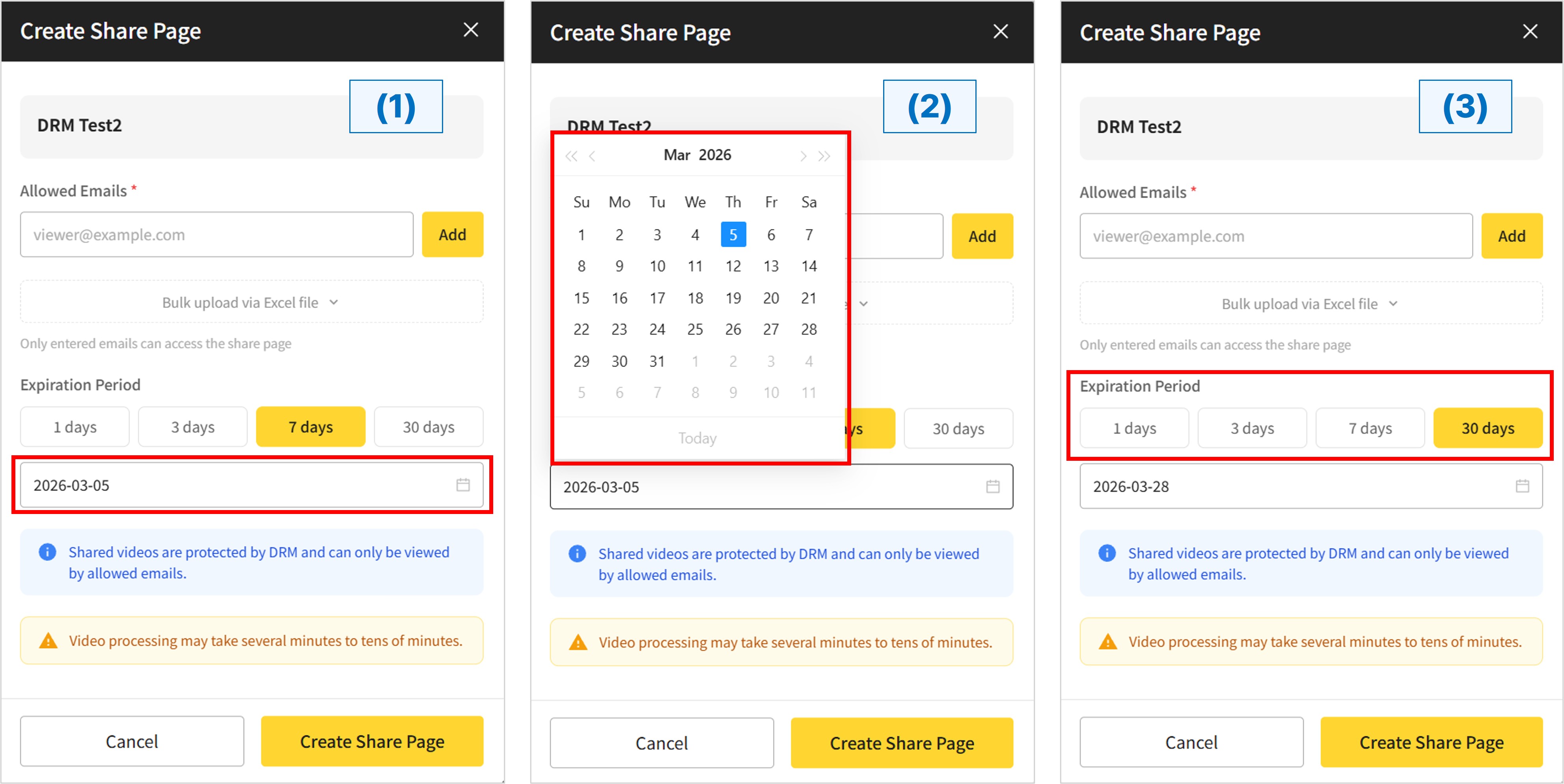
When creating a video share page, you can set an expiration date along with email registration. Previously, users could only choose from preset options: 1 day, 3 days, 7 days, or 30 days. We have now added a Calendar feature, allowing you to specify a precise expiration date with greater flexibility.
[How to use the 'Calendar' feature for Expiration Period]
(1) Click the date field with the calendar icon (located below the Expiration Period presets) during share page creation.
(2) Select your desired expiration date freely from the calendar pop-up.
(3) You can still quickly set the period using the 1, 3, 7, or 30-day buttons as before, based on the creation date.
The video sharing feature in LETR WORKS is a security-focused service powered by DRM (Digital Rights Management) technology. By using the Calendar feature to align expiration dates with specific project deadlines or event closures, you can manage your critical content assets with greater security and systematic control.
-New: Delete OCR Speech Bubbles: Users can now delete speech bubbles generated through OCR (text extracted from images) within the Image Editor.
-Standardized Issue Numbering: The display format for issue numbers in the Image Editor has been unified to ensure consistency and reduce visual confusion.
-Translation Model Fix: Resolved an intermittent issue where translation models were not applied correctly during the creation of Image and Text projects.
-Optimized Editor Scrolling: Fixed an unnecessary screen scrolling issue that occurred when clicking text boxes in the Image Editor, allowing for a more focused workflow.
-Sentence Display Fix: Corrected an error related to sentence rendering during the creation of Text projects.
That’s all for our February update.
We remain committed to continuous research and development to provide you with better performance and more convenient features. We look forward to seeing you again in our next update.
Thank you.
