
AI & Tech
The Master’s Guide to AI Prompting: 5 Rules for Exceptional Results - Part 1

This post was written under LETR WORKS, the former name of LETR AI.
Hello from the LETR WORKS team.
As we wrap up an incredible 2025, it’s a natural time to reflect on just how much has changed. This past year was undeniably the year of AI acceleration. Generative AI tools have transitioned from being “interesting novelties” to becoming essential staples in our daily professional lives.
However, as many of you have experienced, the quality of AI output is only as good as the input. To help you hit the ground running in 2026, we’ve prepared a two-part series on effective prompt engineering strategies. We’ll share five proven rules to help you stop “chatting” with AI and start “directing” it to get the precise, high-stakes results you need.
The Difference: ‘Generic’ vs. ‘Specific’ Prompts
While ChatGPT and Gemini are well-known general-purpose models, many professionals also utilize specialized tools like Claude AI or Perplexity depending on their specific needs. However, the most critical factor remains the same: even within the same model, the quality of the output varies drastically based on the prompt provided by the user.
To illustrate this, let’s compare two different ways to ask an AI for holiday content recommendations.

The results from ChatGPT vary significantly depending on how the request is framed. When asked simply to recommend content without any specific criteria (Prompt A), the AI provides broad suggestions based on general themes like “heartwarming,” “winter vibes,” or “holiday moods”. While these are decent recommendations, they lack a personal touch.
In contrast, when the prompt includes a specific platform (Netflix) and clear user preferences—such as a love for Stranger Things and Academy Award winners (Prompt B)—the AI transforms into a personalized curator. By integrating these requirements, the AI goes beyond a simple list to provide highly personalized categorization, delivering a tailored set of results that align perfectly with the user’s unique tastes.
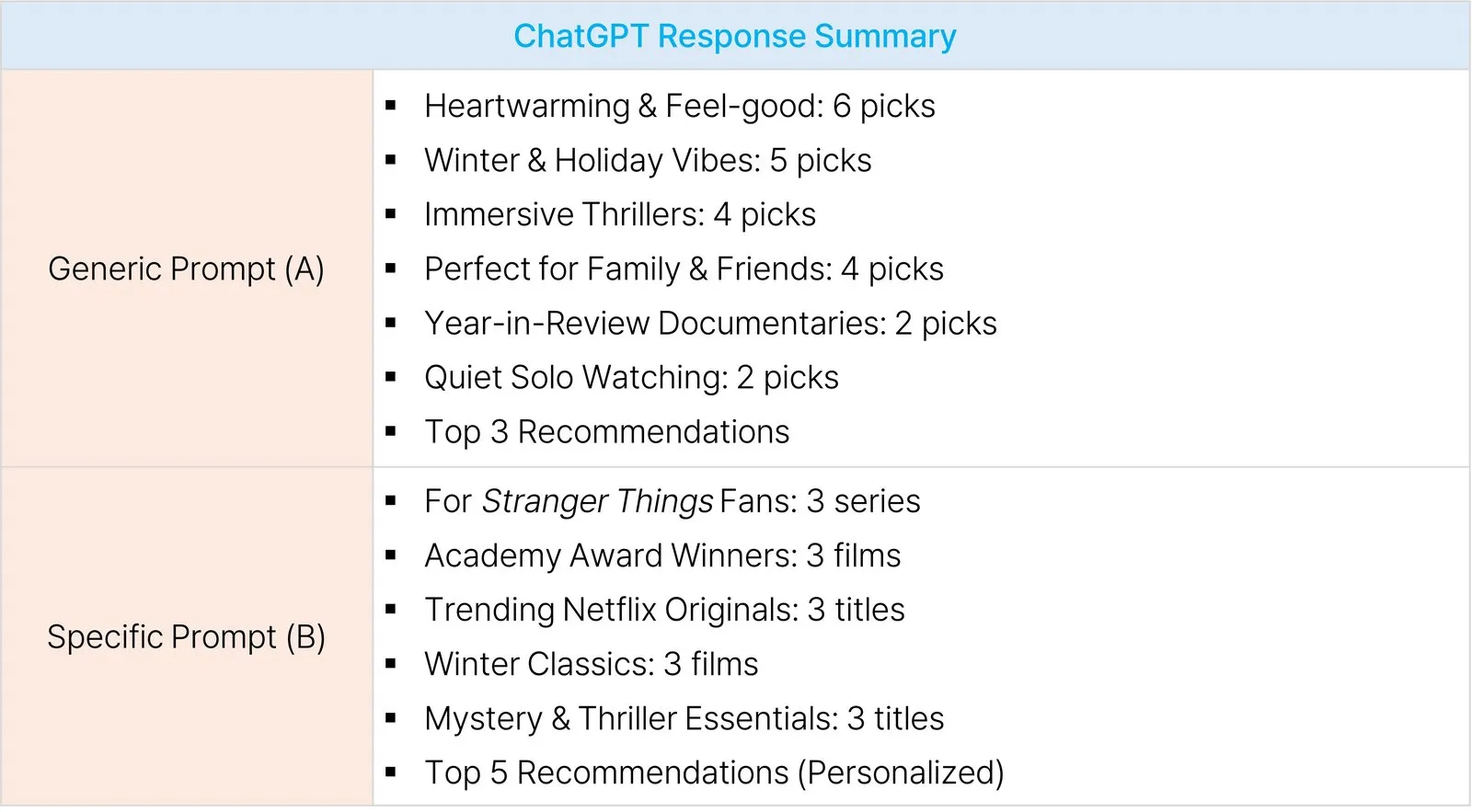
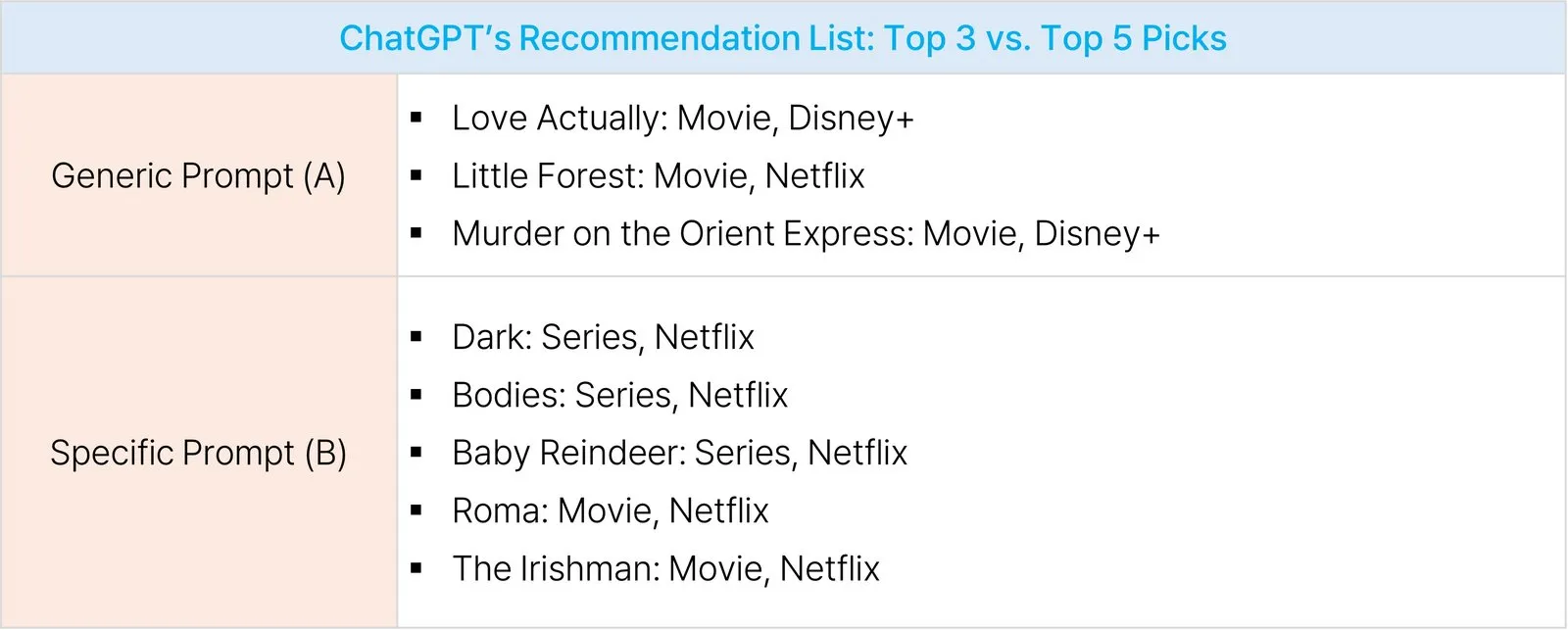
As shown in the image below, ChatGPT’s final output differed in quantity, providing 3 recommendations for Prompt A and 5 for Prompt B.
However, the most significant difference lies in the quality and relevance of the results. By using a specific prompt (Prompt B), the AI successfully connected the user’s preference for Stranger Things and Academy Award winners to curate a specialized list. Instead of generic holiday movies, the AI focused on high-quality mystery thrillers and critically acclaimed masterpieces, demonstrating how a well-crafted prompt can turn a simple AI into a sophisticated personal curator.
AI only answers as much as you ask. As we’ve seen, a specific prompt is the key factor in generating results that are truly “right for you”. Of course, in daily life, a generic prompt can sometimes be useful for discovering genres you hadn’t considered before. However, to ensure your specific tastes and requirements are accurately reflected, detailed instructions are far more effective.
This difference becomes even more apparent when utilizing AI for professional work. For those who want to build better projects with their AI partners, we have curated 5 Essential Rules for “talking smart” to AI. Over the next two posts, we will break down these core strategies to help you master the art of prompting.
💡Rule 1: Assign a Clear ‘Persona’ to the AI
Providing the AI with a specific ‘Persona’—rather than just giving a simple command—dramatically enhances the quality of the output. The key is to grant the AI the authority and expertise that align with the purpose of your request.
Let’s look at an example from the content industry. We will compare a Generic Prompt (A) with a Specific Prompt (B) that incorporates a persona.
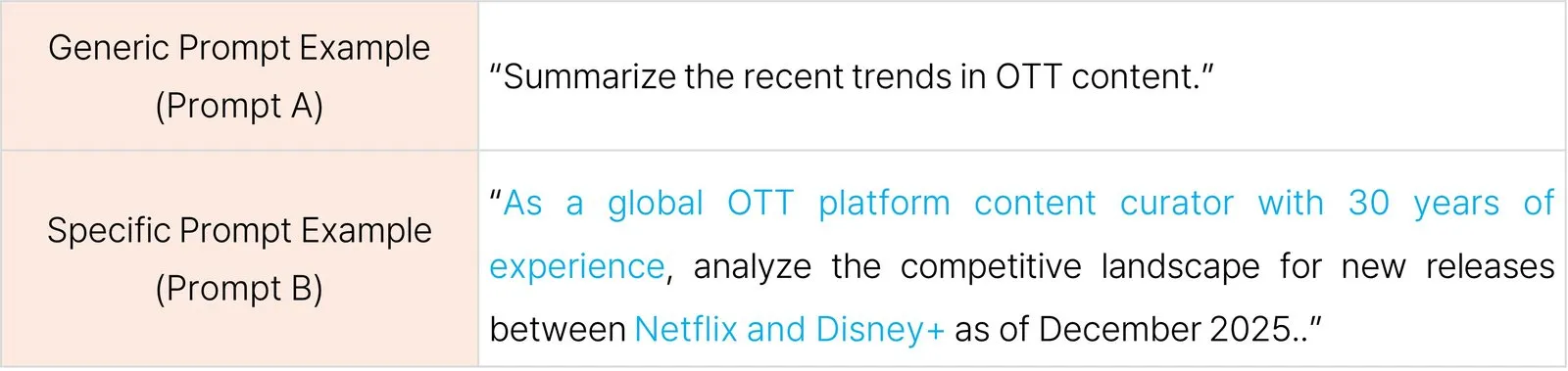
While the Generic Prompt (A) merely provided a broad overview of general OTT market trends, the Specific Prompt (B)—which assigned the role of a “Global OTT Content Curator with 30 years of experience”—delivered a much deeper analysis. It focused specifically on the competitive landscape between Netflix and Disney+, providing detailed insights into their new content lineups and strategic positioning.
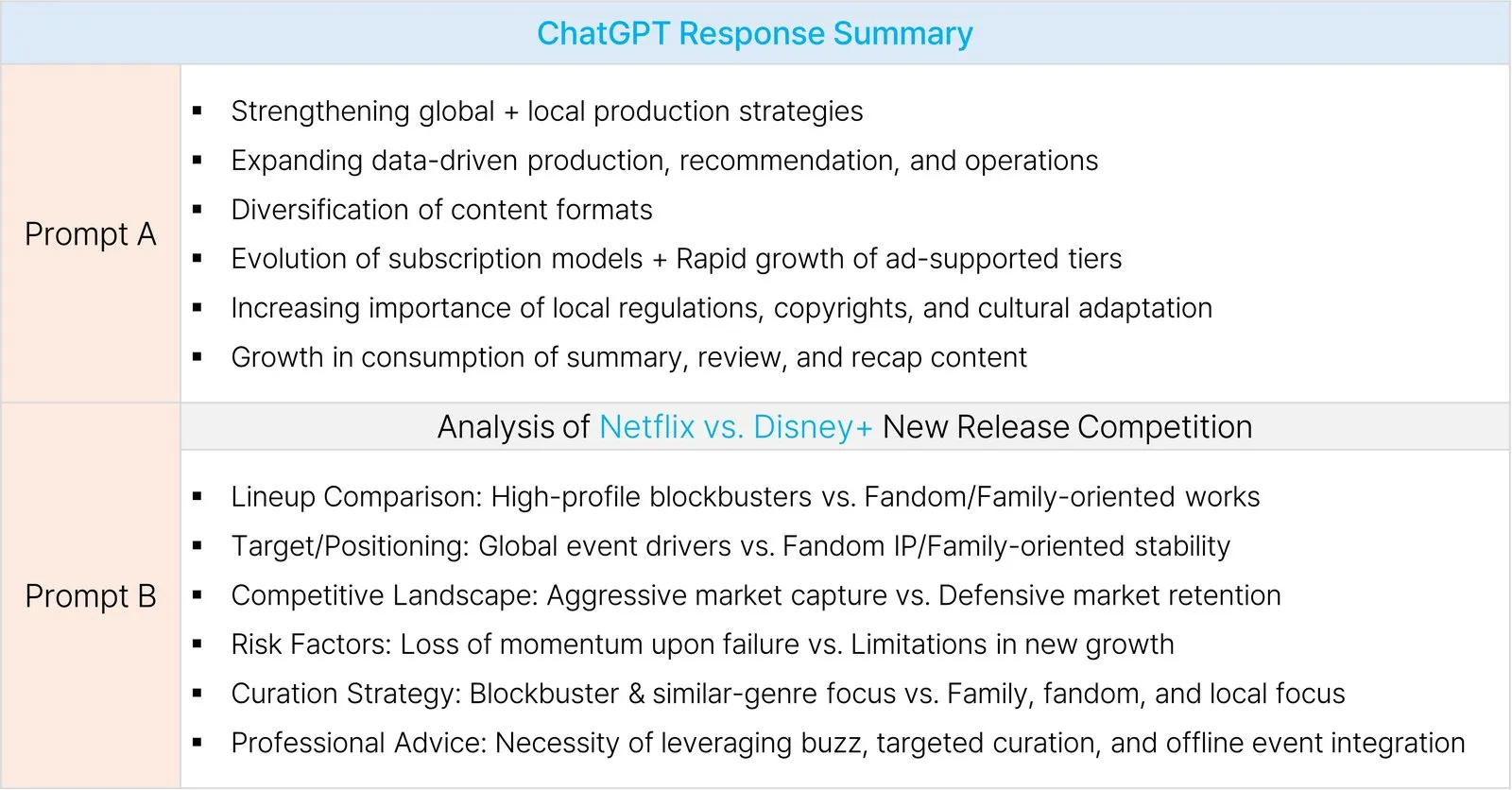
The difference between the two responses becomes even more evident in the ‘Overall Conclusion’ provided by ChatGPT.
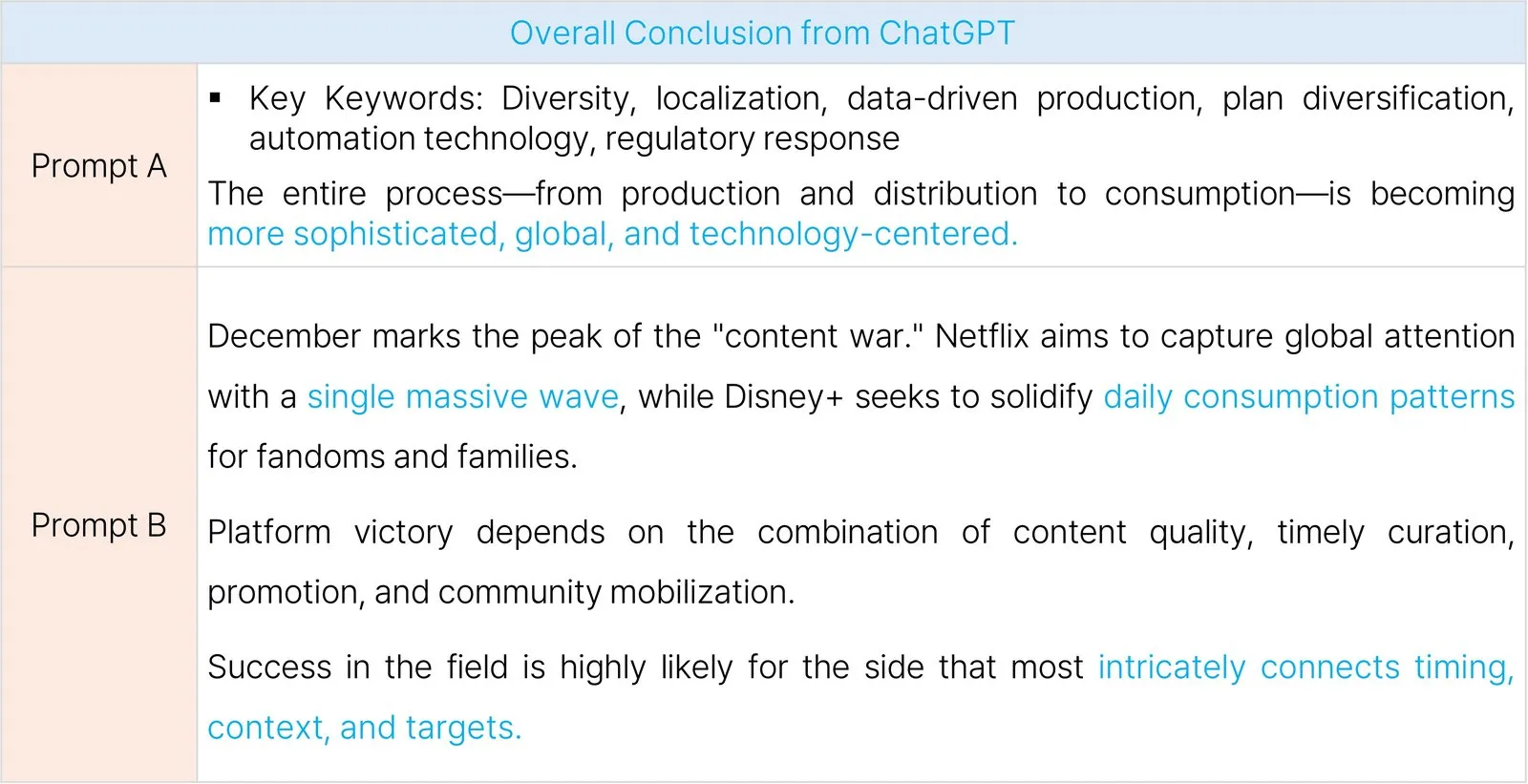
While the output from Prompt A feels like a general report meant for understanding broad trends, Prompt B delivers something much more valuable: strategic advice that a professional content curator could actually use in the field.
By assigning a specific role and demanding a corresponding level of expertise, you transform the AI into a sophisticated collaborator. Give your AI a clear persona—it will then step up as a specialized partner, providing insights tailored to the exact professional standards you’ve set.
🧩 Rule 2: Design the ‘Structure (Format),’ Not Just the Conversation
By pre-specifying the desired structure and format of your content, you can significantly reduce the time spent on re-editing AI outputs. Defining a format is particularly advantageous for tasks that require complex planning or creative brainstorming.
Let’s compare how the AI responds when given a structural framework.
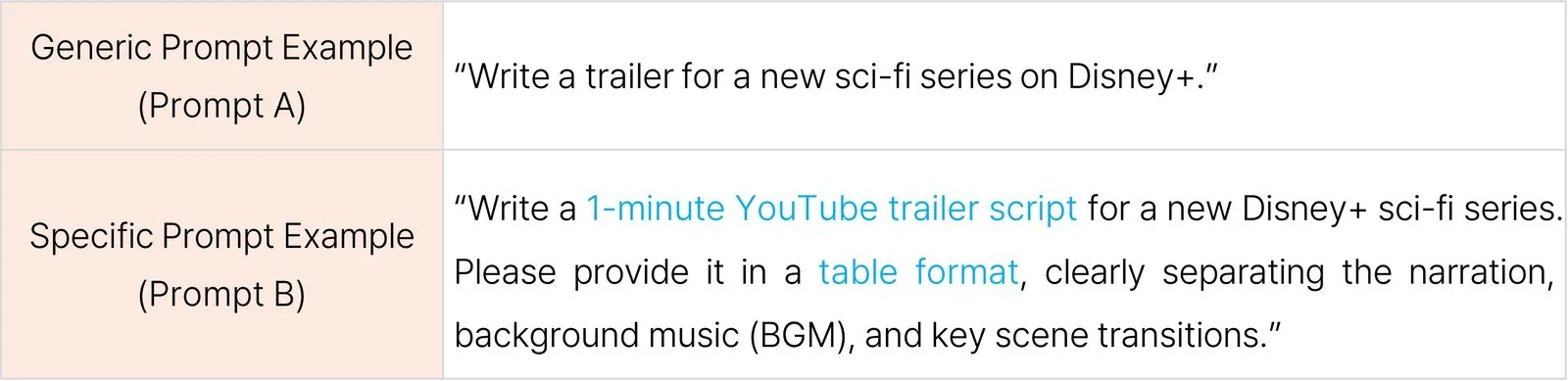
Prompt A resulted in a standard “trailer introduction” style. It suggested a narrative text typical of a Disney+ trailer, essentially writing a fictional synopsis.
Prompt B also created a fictional trailer, but with a crucial difference: it was designed with a clear purpose—a “1-minute YouTube trailer script”—and a precise structure. The output was organized into a table format that included a chronological scene-by-scene breakdown, narration, and sound effects (BGM/SFX).
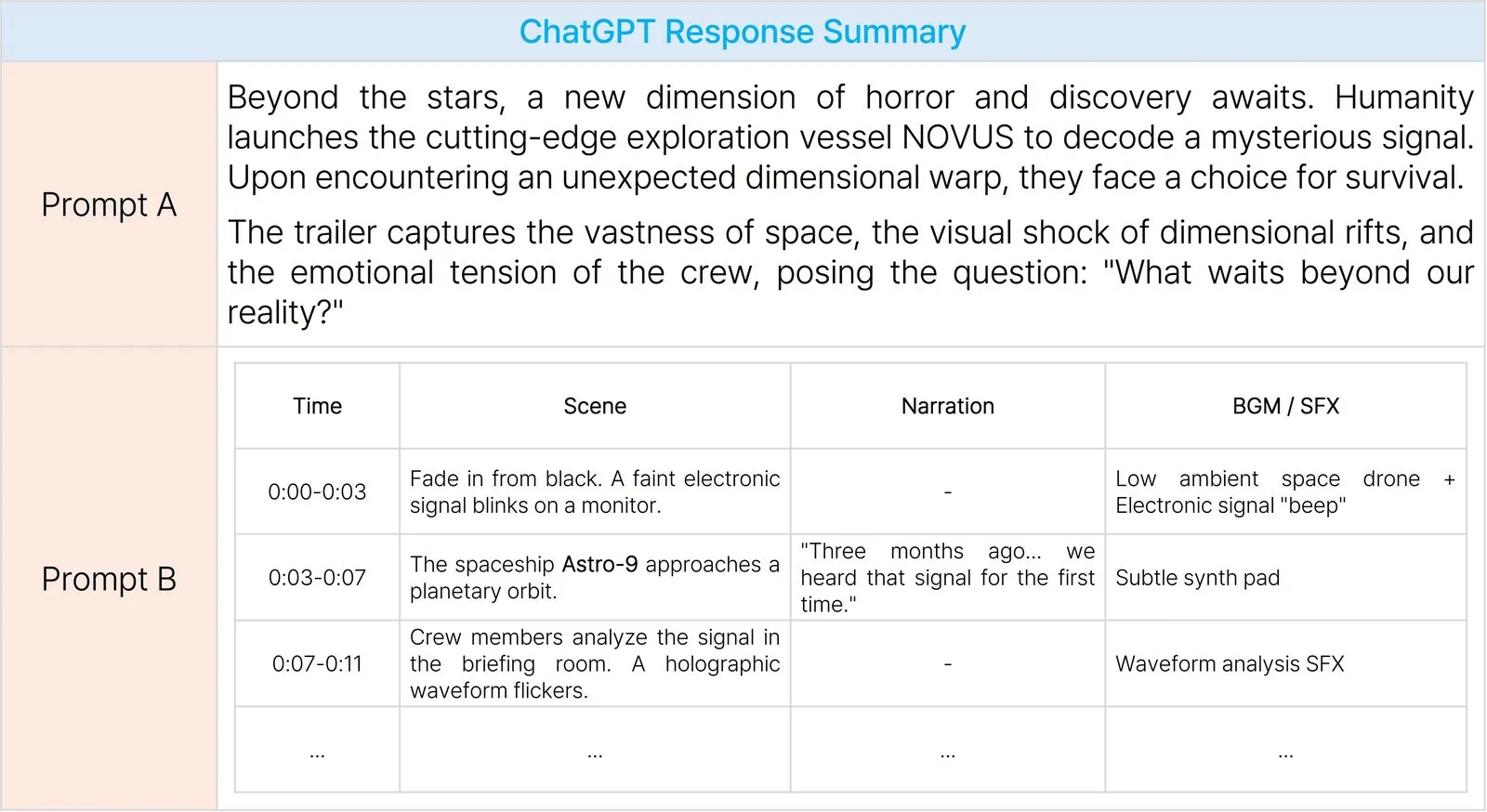
Can you see the difference? While Prompt A is a simple story summary, the output from Prompt B is closer to a detailed storyboard that a video producer could immediately use in the field.
For a production professional, this structured format allows them to intuitively grasp the flow and scenes of the video, enabling them to focus more on developing creative ideas. Furthermore, copying these table-formatted results into document editors like Excel makes editing and refining the content incredibly convenient, greatly boosting work efficiency.
In short, by designing the format, you transform the AI from a simple assistant into a professional-grade production partner that delivers outputs in your exact required style.
In this first installment, we have explored the first two of the 5 Essential Rules for “talking smart” to AI. In our next post, which will be our first update to kick off the new year in 2026, we will return with the remaining three rules.
Stay tuned for Part 2—see you soon!